Get started with AWS
Let’s start with Basics of Cloud first
What is Server ?
Anything that can host a website can be considered a Server.
That anything might be normal computer, device, data centers, offices.
Problems with the traditional system that led us to move to the Cloud.
Cost of Physical assets
Requirement of power supply, space, cooling, maintenance
Manpower is needed to monitor the server.
24×7 Monitoring required.
Issues with scaling.
Disaster issues
Factors That Contributed to the Rise of Cloud Computing
On-demand delivery - You can create a server with just one click when needed.
Pay as you go - You only pay for what you use.
Choose you preference of machine.
Can create server Globally.
Instant fulfillment of the requirements.
Types of Cloud
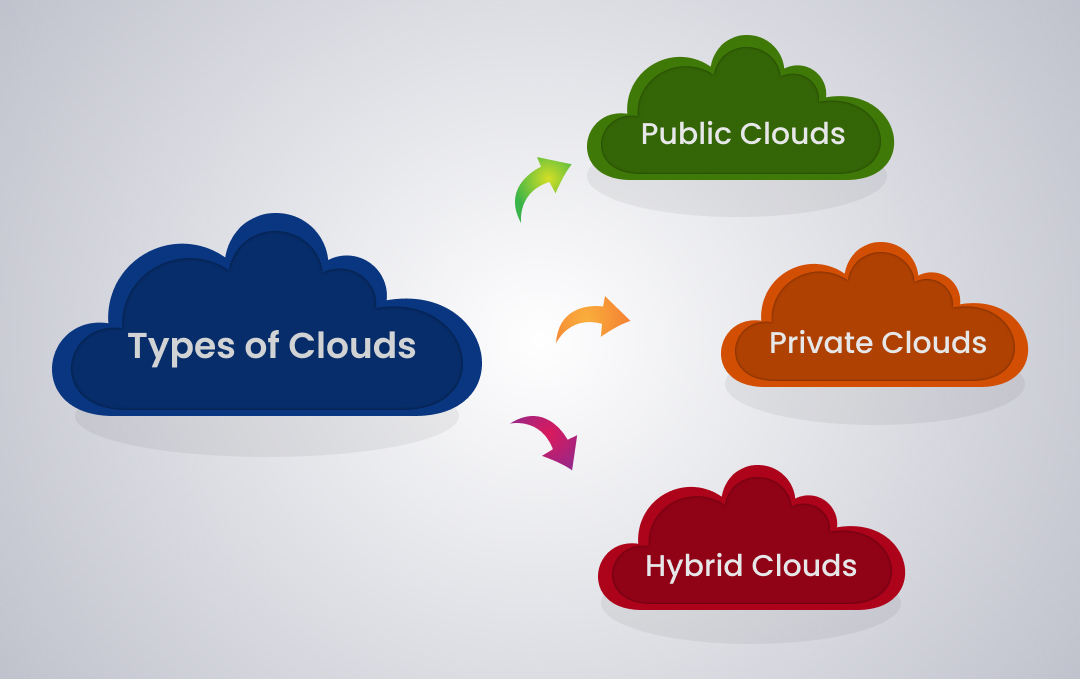
Public
A Cloud platform based on the standard Cloud computing model, where service providers offer resources and application storage to customers, is called a Public Cloud.
It is available to everyone.
AWS, Azure, and GCP are the best examples.
Private
A Cloud platform that offers a secure, cloud-based environment with dedicated storage and hardware resources for a single organization is called a Private Cloud.
Not available to everyone.
Complete control in your hands.
Security specific.
Hybrid
It allows you to use a combination of both public and private cloud services.
Public Cloud for basic computing tasks and Private Cloud for storing confidential data.
Benefits of Cloud
Flexibility
You can create a server with multiple operating system options.
You can create a server with RAM ranging from 0.5 GB to 192 GB.
Select storage based on your needs.
Scalability
- You can increase or decrease the number of servers anytime with just one click, according to your needs.
Cost Effective
- Pay only for what you use on an hourly basis.
High Availability
You can create servers globally.
You can create multiple servers.
SLA of 99.99%.
Types of Computing Models
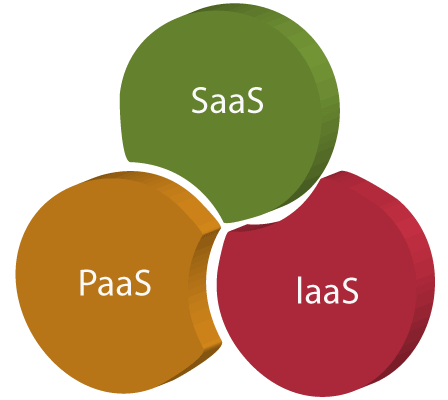
Infrastructure as a Service
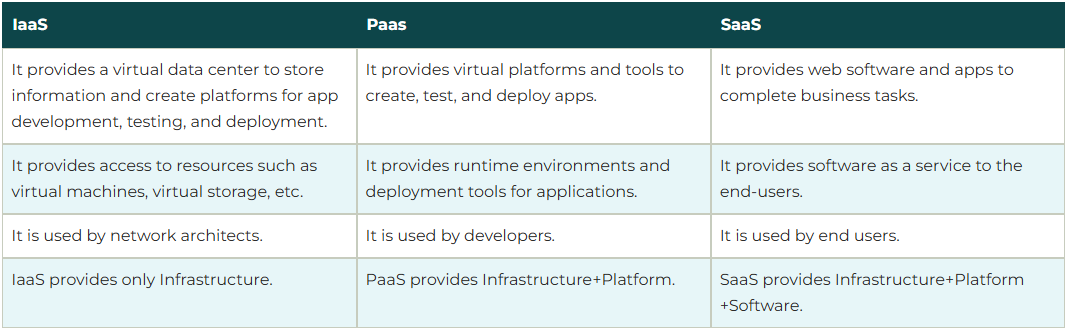
IaaS includes the basic building blocks of cloud IT and typically provides access to networking features, computers, and data storage space.
EC2 Instance is the example of IaaS.
Platform as a Service
PaaS vendors eliminate the need for organizations to manage the underlying infrastructure, allowing you to focus on deploying and managing applications.
Elastic Beanstalk is the example of PaaS.
Software as a Service
SaaS vendors provide you with applications that are run and managed by the vendors.
In SaaS, you don't have to worry about maintaining the service or managing the underlying infrastructure.
You just need to worry about how you will use the particular piece of software.
Gmail and Dropbox are examples of SaaS.
AWS Global Infrastructure
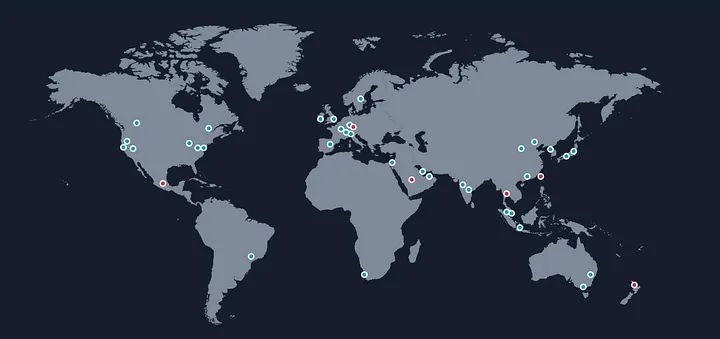
Regions:
A Region is a geographical area that contains multiple, isolated, and physically separate Availability Zones. Each Region is designed to be completely independent of other Regions, providing fault tolerance and stability.
Key characteristics:
Regions are spread across the globe. As of 2024, there are over 30 launched Regions worldwide
Each Region has a unique name after their geographic location (e.g., us-east-1 for US East (N. Virginia))
Not all AWS services are available in all Regions
Data stored in a Region stays in that Region unless explicitly transferred.
Availability Zones (AZs):
Availability Zones are distinct locations within a Region that are engineered to be isolated from failures in other AZs.
Key characteristics:
Each AZ has independent power, cooling, and physical security
Connected through low-latency links
Typically, a Region has 3 or more AZs
AZs are represented by a unique Region name followed by a letter identifier (e.g., us-east-1a)
Edge Locations:
Edge Locations are sites deployed in major cities and highly populated areas across the globe.
Key characteristics:
Much more numerous than Regions or AZs (200+ locations globally)
Used to cache content closer to end-users, reducing latency
Support AWS Shield for DDoS protection
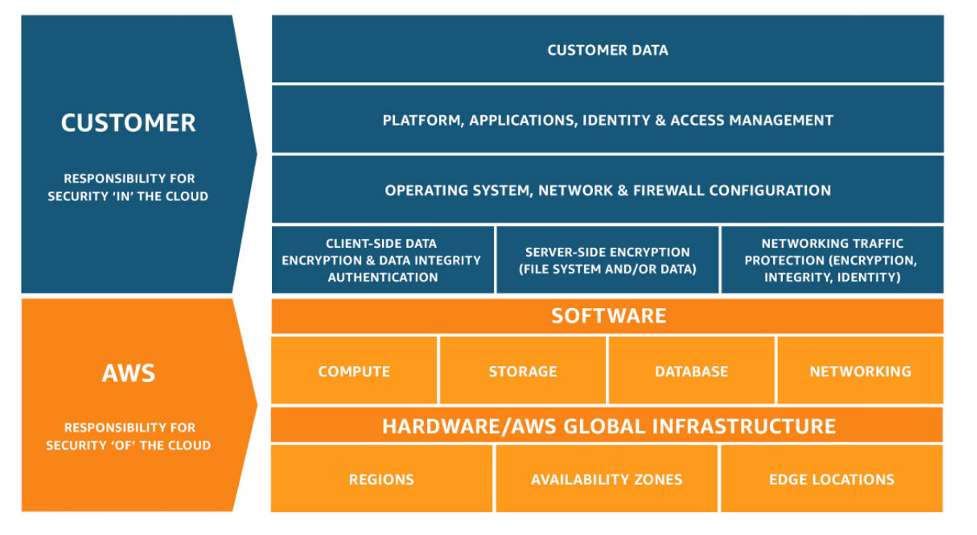
AWS shared responsibility model
Regional vs Global AWS Services.
Most of the AWS services are Regional.
Below are a few Global services in AWS.
IAM
Organizations
Route 53
ACM
CloudFront